Insert ubuntu CD
Select "Try ubuntu without any change to current system" option
Open Accessories >terminal
Type: sudo fdisk -l
This command will list all partions in hard disk
find the partion ,in my case it is sda2
sudo mount /dev/sda2 /mnt
sudo mount --bind /dev /mnt/dev
sudo chroot /mnt
update-grub
grub-install /dev/sda2
grub-install --recheck /dev/sda2
sudo umount /mnt/dev
sudo umount /mnt
Now reboot, you will find that grub only contain ubuntu
Dont panic! we are not yet done
Boot to ubuntu
Open Accessories >terminal
Type: sudo update-grub
Now reboot
Saturday, September 25, 2010

Thursday, September 23, 2010

Tuesday, July 6, 2010
UBUNTU Upgrade
UBUNTU can upgrade in two ways
1) ONLINE http://www.ubuntu.com/desktop/get-ubuntu/upgrade
2) OFFLINE Download alternative ubuntu from www.ubuntu.com (for example here taking ubuntu 10.04)
then open terminal and go to where the ISO file is located and type the following
sudo mount -o loop ubuntu-10.04-desktop-i386.iso /media/cdrom0 (press enter type your passwd)
1) ONLINE http://www.ubuntu.com/desktop/get-ubuntu/upgrade
2) OFFLINE Download alternative ubuntu from www.ubuntu.com (for example here taking ubuntu 10.04)
then open terminal and go to where the ISO file is located and type the following
sudo mount -o loop ubuntu-10.04-desktop-i386.iso /media/cdrom0 (press enter type your passwd)
after that
press ALT+f2 Box will appear in that type gksu sh /cdrom/cdromupgrade (press OK)
now upgrade will be started.
now upgrade will be started.
Sunday, March 28, 2010
VIRUS CLEAR
We are all know about the common viruses in our System(Autorun.inf and New Folder)
For U I am uploading 2 java programs to delete them. Save them and run them.
First one,for removing autorun.inf and it's internal virus.
second one,for removing Newfolder virus.
First thing you have to read the "readme" file.Below link is available.
Below link is available.It's Zip file you have to extract it.
http://www.mediafire.com/?43vn3zznmkz
For java software click the below link
http://java.sun.com/javase/downloads/index.jsp
My suggestion is when you insert the Pendrive just run the AutoRunClear prog.
For U I am uploading 2 java programs to delete them. Save them and run them.
First one,for removing autorun.inf and it's internal virus.
second one,for removing Newfolder virus.
First thing you have to read the "readme" file.Below link is available.
Below link is available.It's Zip file you have to extract it.
http://www.mediafire.com/?43vn3zznmkz
For java software click the below link
http://java.sun.com/javase/downloads/index.jsp
My suggestion is when you insert the Pendrive just run the AutoRunClear prog.
Saturday, November 14, 2009
Ubuntu installation using pendrive

By using pendrive also you can install the Ubuntu.
1) For Windows users Click here.
2) For Linux users Click here.
Sunday, August 30, 2009
Network connection in Ubuntu
If you have ip address to connect the internet,the connections are like this
SYSTEM==>preferences==>internet connections------>wired(already Auto eth0 is there in that EDIT it or click on ADD button then a new window will be appear)-------------->IPV4 settings------>>
Method:Manual
ADDRESSES----------------->click ADD button then
type u r IP address, subnet mask, gateway and below that DNS server------->click ok
SYSTEM==>preferences==>internet connections------>wired(already Auto eth0 is there in that EDIT it or click on ADD button then a new window will be appear)-------------->IPV4 settings------>>
Method:Manual
ADDRESSES----------------->click ADD button then
type u r IP address, subnet mask, gateway and below that DNS server------->click ok
Thursday, August 13, 2009
Flex builder for Ubuntu
First
You install java
second
The current version of Flex Builder will only work with Eclipse (europa) this put it in Home directory.
Eclipse click here
Third
Adobe Flex builder Click here
Adobe flex builder for linux after downloaded.Right click and choose "open with other application" then like this
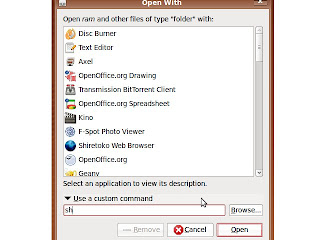
click open and install
You install java
second
The current version of Flex Builder will only work with Eclipse (europa) this put it in Home directory.
Eclipse click here
Third
Adobe Flex builder Click here
Adobe flex builder for linux after downloaded.Right click and choose "open with other application" then like this

click open and install
Subscribe to:
Posts (Atom)